What’s a Good Motherboard for Gaming? The Ultimate 2026 Buying Guide
When you are building a gaming PC, you get confused while choosing a motherboard. Everyone discusses CPUs and GPUs, but the motherboard that connects them decides how powerful your PC can be. This guide explains which features of the motherboard are important for gaming using real specifications and test results instead of marketing claims.
What’s a good motherboard for gaming? It’s not the most expensive one. It’s the one that is compatible with your processor and use case. If you are looking for the best motherboard for gaming, choosing parts for a new desktop PC, or trying to find a motherboard that is compatible with your CPU, use our bottleneck calculator before making your final decision.
What’s a Good Motherboard for Gaming (Quick Answer)
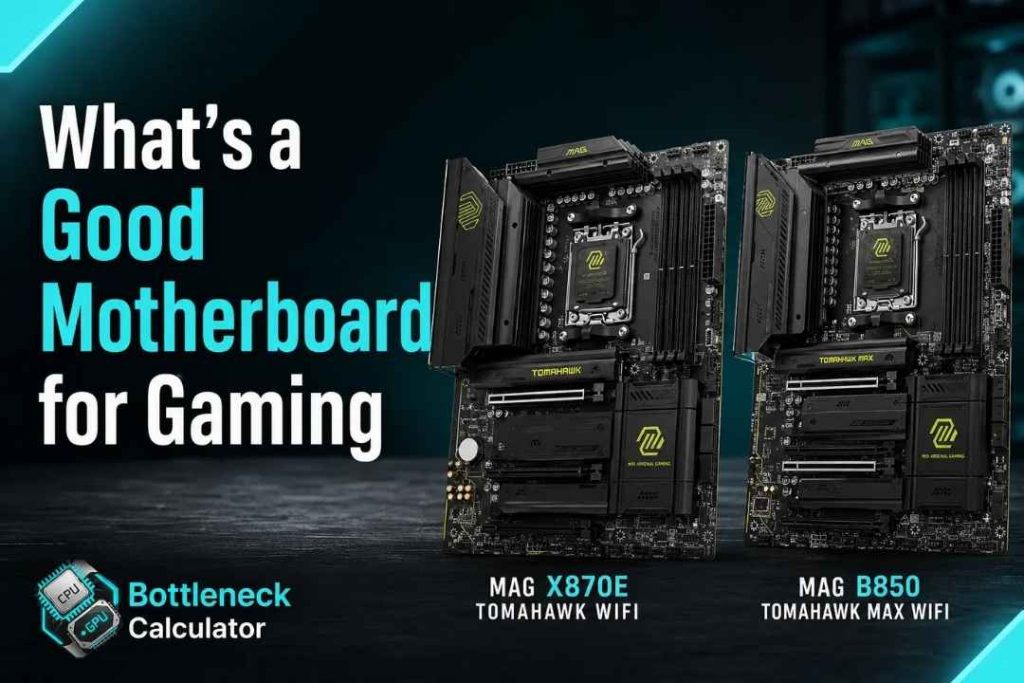
The MSI MAG X870E Tomahawk WiFi (~$270) is the best motherboard for AMD builds. If you want a mid range motherboard, MSI MAG B850 Tomahawk MAX WiFi (~$220) is the best option.
For Intel builds, the MSI MAG Z890 Tomahawk WiFi (~$300) is the best option if you want great features at an affordable price. First, choose a motherboard that is compatible with your CPU. Use AM5 for Ryzen 7000/9000 processors and LGA1851 for Core Ultra 200S processors.
Does a Motherboard Really Affect Your Gaming Performance?
No, a motherboard doesn’t directly affect gaming performance. A powerful GPU increases frame rates, not the motherboard. The motherboard affects the maximum performance of CPU, GPU and RAM can achieve together. It is the foundation on which your entire system depends, not a component that runs it.
The effect becomes significant when your PC is under heavy load for a long time. But when you play games for a long time, a weak power delivery can cause the CPU to reduce its performance to prevent overheating. As a result, your frame rates may decrease without even realizing it.
“Will this board make me faster?” is not the real question. The real one is “will this board hold my CPU back?” When you understand the difference, you will be able to select the right motherboard.A good gaming motherboard is not the one that makes your PC faster. Instead, it’s the one that lets your CPU perform at its full potential without limiting it.
If you don’t know whether your CPU and GPU are well balanced, run our bottleneck calculator to check the components. It will save you from buying a new motherboard.
Socket and Chipset Compatibility Comes First
Before comparing features, your motherboard has to physically support your CPU. AMD’s current gaming CPUs use the AM5 socket, while Intel’s latest generation runs on LGA1851, with LGA1700 still relevant for older 12th to 14th Gen builds.
Chipsets sit one layer below the socket and determine how much of that CPU’s potential you can unlock. Higher-tier chipsets like X870E or Z890 add overclocking headroom and more PCIe lanes, while B-series and H-series boards trade some of that flexibility for a lower price.
Get the socket wrong and nothing else on this list matters, since the board simply won’t accept your processor. Always confirm compatibility on the manufacturer’s site, and double-check the exact CPU model, before adding anything to your cart.
Getting a good motherboard and CPU for gaming paired correctly right here avoids almost every headache later in the build. The same logic applies whether you think of it as choosing a good chip and motherboard for gaming, or simply picking a good motherboard and processor for gaming as a matched set.
It’s also worth checking whether a BIOS update is needed to support your specific CPU generation on that board. Some retailers sell “BIOS flashback” versions of popular boards specifically to solve this problem out of the box.
VRM and Power Delivery: The Spec Everyone Skips
VRM stands for Voltage Regulator Module, and it’s the part of the board responsible for feeding your CPU clean, stable power. A weak VRM runs hotter, throttles sooner, and can shorten the lifespan of pricier processors over time.
You’ll usually see this listed as something like “8+2” or “16+2” phases. As a rough guide, a Ryzen 5 or Core i5 build is comfortable on a 6+2 phase design, while a Ryzen 7, i7, or anything higher performs better with 8+2 phases or more.
Phase count alone doesn’t tell the full story, though. A well-engineered 12-phase board using quality components can easily outperform a cheaper 16-phase board padded with weaker parts, so it’s worth checking independent thermal reviews before trusting the spec sheet alone.
This is exactly the spec to check if you’re after a good gaming motherboard for Ryzen 7 or similar high-core-count chips, since these processors lean on VRM stability more than budget CPUs do.
PCIe Generation and Storage: How Much Do You Actually Need?
PCIe generation determines how fast your GPU and SSDs can communicate with the rest of your system. PCIe 4.0 is still plenty for every graphics card on the market today, since current GPUs don’t come close to saturating even that bandwidth in real gameplay.
For storage, the story is a little different. Dropping a PCIe Gen 5 SSD into a Gen 4 slot works fine, but it runs at half its rated bandwidth, which matters more for heavy file transfers and content work than for game loading itself.
Most gamers are better served prioritizing M.2 slot count over chasing the newest PCIe generation. Two fast NVMe slots will serve a typical build better than one slot supporting a standard your SSD can’t fully use anyway.
Also check whether your chosen M.2 slots share bandwidth with your GPU slot. On some budget boards, filling a second M.2 slot can quietly drop your graphics card down to fewer PCIe lanes.
RAM Support: DDR4 or DDR5 for Gaming?
DDR5 has become the standard on every current-generation AMD and Intel platform, and for good reason. It offers higher bandwidth and better long-term upgrade potential compared to DDR4, even though early DDR5 kits carried a noticeable price premium.
If you’re building fresh in 2026, DDR5 is the safer long-term choice, especially on AM5 and LGA1851 boards where DDR4 support doesn’t even exist anymore. DDR4 boards still make sense only if you’re reusing memory from an older build to keep costs down.
Beyond the standard itself, check your board’s maximum supported speed and capacity. A board that only officially supports lower memory speeds can quietly bottleneck a high-end RAM kit you paid extra for.
Form Factor: ATX, Micro-ATX, or Mini-ITX?
Form factor decides which case you need and how many expansion slots you get to work with. Full-size ATX boards offer the most PCIe slots, M.2 sockets, and RAM slots, making them the safest pick if you’re not tight on space.
A good ATX motherboard for gaming is usually the easiest recommendation for a first build, simply because you’re not fighting size limitations while learning what specs matter.
Micro-ATX trims the board down slightly, usually dropping a slot or two, but keeps most of the features that actually matter for gaming. It’s a smart middle ground for builders who want a smaller case without giving up performance.
Mini-ITX goes further, fitting everything onto a single expansion slot footprint for genuinely compact builds. You’ll trade away some connectivity and cooling headroom, so it’s best suited to builders who value desk space over maximum upgrade room.
If you’re specifically after a good motherboard for Mini-ITX gaming, prioritize models with reinforced VRM cooling, since compact designs naturally run hotter under load.
Cooling and Connectivity Features That Actually Matter
VRM heatsinks deserve more attention than they usually get. A large, well-finned heatsink that makes real contact with the power stage keeps temperatures down during long ranked sessions, while a thin decorative shroud does very little beyond looking good in photos.
Networking has also moved forward quickly, with Wi-Fi 7 now appearing on higher-end 2026 boards alongside the older Wi-Fi 6E standard. For competitive gaming, a wired 2.5GbE connection still beats any wireless standard on latency, so treat Wi-Fi as a convenience feature rather than a performance one.
Audio and USB matter more than most builders expect too. A flagship-class audio codec noticeably improves headset clarity, and having enough fast USB-A and USB-C ports upfront saves you from hunting for a hub once your peripherals start piling up.
This section matters most if you’re after a good motherboard for gaming and streaming, since that combo puts real strain on USB bandwidth, network stability, and capture card connectivity all at once.
AM5, AM4, LGA1851, or LGA1700: Choosing the Right Platform
AMD has committed to supporting the AM5 socket through 2027 and beyond, meaning boards you buy today should accept upcoming CPU generations without a full rebuild. That kind of longevity is rare in PC hardware and makes AM5 boards a genuinely long-term investment.
AM4 still has a place for budget builds pairing something like a Ryzen 7 5700X3D with an inexpensive board, since older boards are now heavily discounted. It’s a smart way to build cheap without sacrificing real gaming performance.
Intel’s platform cycle moves faster, with LGA1851 replacing LGA1700 in a shorter window than AMD’s socket refreshes. If future upgrade flexibility matters to you, that’s worth weighing against Intel’s usually strong per-core gaming performance.
Whether you land on a good Intel motherboard for gaming or a good motherboard for gaming on AMD, socket longevity should weigh just as heavily in your decision as raw benchmark numbers.
How Much Should You Spend on a Gaming Motherboard in 2026?
Your budget should scale with your CPU, not the other way around. Spending more on the motherboard than your processor rarely makes sense unless you’re planning serious overclocking or a long-term platform investment.
Between $75 and $150, expect solid micro-ATX boards with DDR5 support and basic Wi-Fi, comfortable enough for a Ryzen 5 or Core i5-class build. The $150 to $300 range is the sweet spot for most gamers, adding upgraded VRMs, dual M.2 slots, and Wi-Fi 6E or 7.
Past $300, you’re paying for extras like premium audio codecs, extreme overclocking headroom, and flagship-tier connectivity. That’s worth it if you’re running a top-end CPU or building for content creation alongside gaming, but it’s overkill for most 1080p or 1440p setups.
Figuring out what is a good budget motherboard for gaming, or even a good cheap motherboard for gaming, really just means matching one of these price bands to your CPU tier rather than guessing. The right price for a gaming motherboard is whatever keeps it proportional to the rest of your build.
Best Gaming Motherboards by Use Case in 2026
If you’re comparing good PC motherboards for gaming across brands, ASUS, MSI, ASRock, and Gigabyte all have strong 2026 lineups, and the picks below are a solid starting point for a recommended motherboard for gaming PC in each category.
For an AMD build with no compromises, the Asus ROG Crosshair X870E Glacial pairs a strong VRM with extensive PCIe 5.0 support, ideal for a flagship Ryzen 9000 build. Budget-focused AMD builders should look at the Asus TUF Gaming B650 Plus WiFi, which covers DDR5 and Wi-Fi without the high-end price tag.
On the Intel side, the Asus ROG Maximus Z890 Hero suits anyone running a Core Ultra 9 alongside a high-end GPU, while the ASRock B860 Steel Legend WiFi delivers similar core features at a fraction of the cost. Both hit a strong balance of stability and price for their tiers, and both are a good ASUS or Gigabyte motherboard alternative depending on which brand you already trust.
Building small doesn’t mean giving up features either. The ASRock B850I Lightning packs Mini-ITX convenience with modern connectivity, making it a strong pick for compact gaming builds that still need real upgrade room down the line. If MSI is your preferred brand, their B850 and Z890 Tomahawk boards are consistently the choice for a good MSI gaming motherboard among builders comparing notes on forums and Reddit threads.
5 Mistakes to Avoid When Buying a Gaming Motherboard
A flashy “gaming” name doesn’t guarantee good hardware underneath it. Some budget boards marketed heavily toward gamers actually throttle mid-range CPUs under sustained load because of weak VRM cooling hidden under a plastic shroud.
Chasing PCIe slot count is another common trap. Most builds never use more than one x16 slot and one x1 slot, so extra slots on paper rarely translate into real-world value for a typical gaming setup.
Ignoring BIOS update methods before buying can also bite you later, since some boards need an older CPU installed just to flash support for a newer one. Lastly, don’t assume the priciest board in a lineup is automatically the most stable; independent VRM testing tells a more honest story than the price tag does.
How We Evaluated These Motherboards
Every recommendation here is cross-checked against independent testing data covering VRM thermal performance, real gaming benchmarks, and sustained-load stability, rather than relying on manufacturer marketing claims alone. Pricing and chipset availability were verified against current 2026 listings to keep this guide accurate at publish time.
Boards that showed throttling under normal gaming loads, or that were discontinued or hard to find in stock, were excluded from the use-case picks above. This guide will be revisited as new chipsets and CPU generations launch through the year.
Frequently Asked Questions
Not directly. Spending more improves stability, features, and overclocking headroom, but your CPU and GPU still decide your actual frame rate.
A good motherboard for a gaming PC is one that matches your CPU’s socket exactly, includes a VRM rated for that CPU’s power draw, and offers enough M.2 and USB ports for your storage and peripherals.
A good budget motherboard for gaming typically sits in the $75 to $150 range, pairing DDR5 support and basic Wi-Fi with a VRM that’s sufficient for a Ryzen 5 or Core i5-class CPU.
For current Intel CPUs, a good motherboard is any well-reviewed LGA1851 board on the Z890 or B860 chipset, chosen based on whether you need overclocking headroom or just stable performance.
Yes, it will work fine but run at Gen 4 speeds instead of its full rated bandwidth.
It’s convenient if you can’t run an Ethernet cable, but a wired connection will always be more stable for competitive, low-latency gaming.
Two are comfortable for most builds: one for your OS and one for games or a secondary drive.
On AM5 and current LGA1851 boards, likely yes for a few generations. On older or budget boards, always check the manufacturer’s compatibility list first.
Brand reputation helps with warranty and BIOS support, but the specific model’s VRM and feature set matter far more than the logo on the box.
Not really. B-series and equivalent boards deliver the same gaming performance for a lower price when overclocking isn’t a priority.
Final Verdict
A good gaming motherboard isn’t the one with the flashiest RGB or the longest spec sheet. It’s the one that matches your CPU, keeps power delivery stable, and gives you just enough room to upgrade later.
Start with your socket, check the VRM, then let your budget guide the rest. Get those three right, and everything else on this list falls into place naturally, no matter which brand ends up in your case.
Before you finalize your build, it’s worth running your exact CPU and GPU combo through a free bottleneck calculator to confirm the rest of your parts are pulling their weight too.